


You edited the API key out of the Jira ticket. Here is where it still lives
Also published on Atlassian Community
In this guide
- Belief 1: editing the description removes the value
- Belief 2: deleting the comment is enough
- Belief 3: if JQL cannot find it, it is gone
- Belief 4: Confluence works the same way
- Belief 5: Atlassian can clean the history for you
- Belief 6: once rotated, the old text does not matter
- The order to follow
- Where LeakRadar fits
Someone pastes a database password into a Jira description. A teammate spots it ten minutes later, edits the description, and everyone relaxes. The password is gone from the page. It is still in several other places.
LeakRadar is a secret and personal data scanner for Jira and Confluence Cloud from Radrly. This guide answers six common beliefs about removing a leaked value, with what Atlassian's own tools do about each. The app comes in near the end. Advanced-only features are labelled (Advanced).
Belief 1: editing the description removes the value
It removes it from the current text. Jira keeps every field change, and the History tab of the work item shows the old and the new value of summary, description and environment. Anyone who can browse the work item can open that tab, so the audience for the old value is everyone who can see the ticket today.
Belief 2: deleting the comment is enough
Watchers and the reporter usually got a notification email with the comment text when it was added. Deleting the comment does not recall those emails. If the work item was shared with a customer through a service portal, assume they saw it too.
Belief 3: if JQL cannot find it, it is gone
JQL text ~ searches the current text of summaries, descriptions, comments and text fields. It does not search field history and it does not read attachments. A clean search result tells you the current text is clean and nothing more.
Belief 4: Confluence works the same way
Confluence keeps older page versions, and anyone with view access can open the page history and compare versions. Editing the page leaves the value in every version saved since it was added. A space admin can delete older versions from page history, one at a time, while the current version always stays.
Belief 5: Atlassian can clean the history for you
Partly, if you have the right plan. With Atlassian Guard Premium, an organization admin can redact sensitive data from a finding. In Jira that covers the field and the work item history, and in Confluence the current version, with an option to delete earlier versions that contain it. Redacted content can be restored through the Guard Detect API for 30 days and then it is gone. The admin needs access to the Jira work item, so issue security can get in the way.
Belief 6: once rotated, the old text does not matter
For a password or token, rotation is what makes the old text harmless, which is why it comes first. Personal data cannot be rotated. A passport number or a bank account in a ticket stays a problem until the text and its history are cleaned.
The order to follow
1. Rotate or revoke the credential at the provider. 2. Redact the current text. 3. Purge older Confluence versions that still contain it. 4. Check Jira history and restrict the work item if the value is still readable there.
Where LeakRadar fits
LeakRadar scans the current text and also the latest 20 history entries of summary, description and environment, and up to 15 older versions of a Confluence page or blog post. It uses built-in secret detectors, keeps only a masked snippet and a keyed hash, and groups the same value found in several places into one finding.
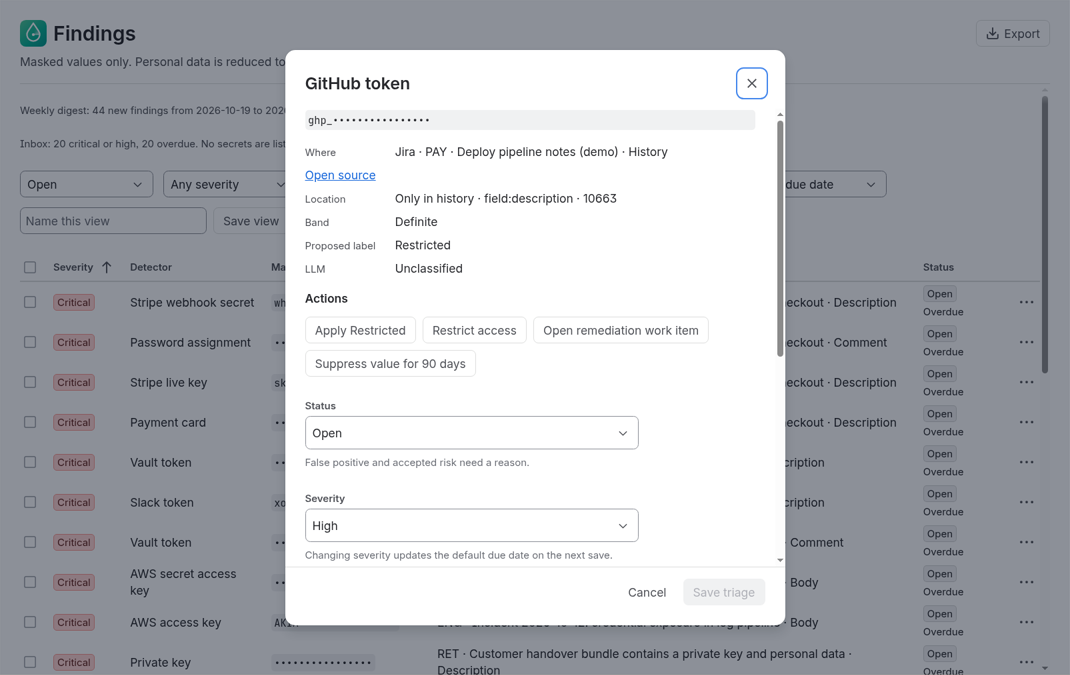
Open a finding and the detail shows the masked value, where it is, the location, a proposed sensitivity label and the actions in rotate-first order. Redact in place replaces the value with [REDACTED by LeakRadar] in the current version, as you, after you confirm. Restrict access applies a Jira security level and can be undone.
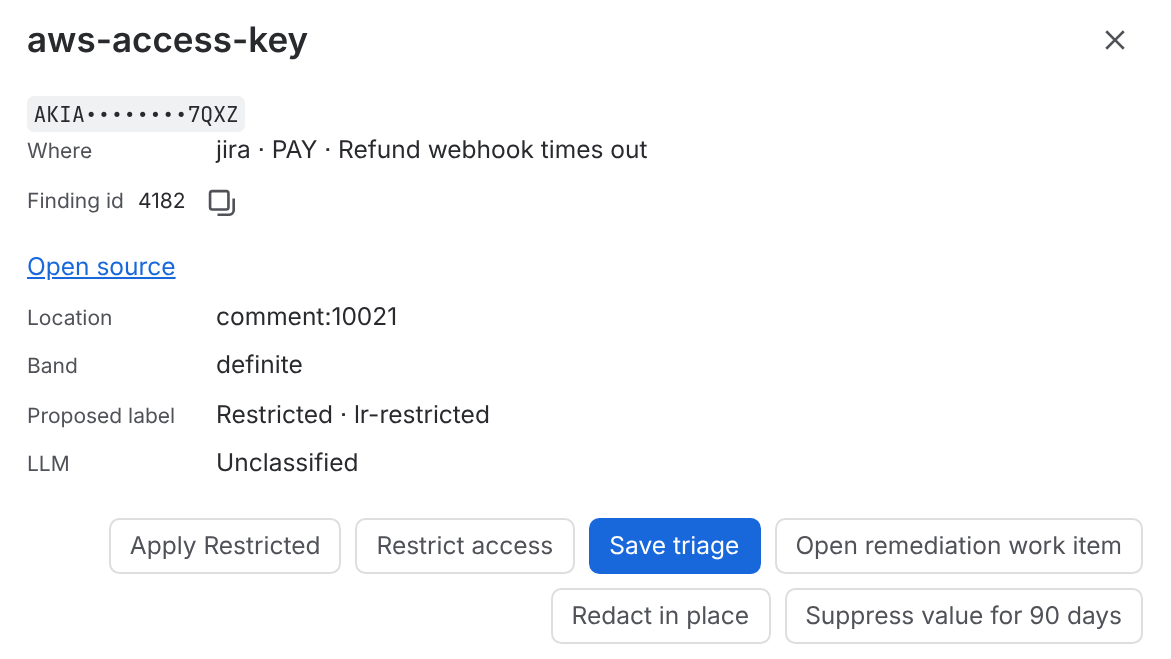
For Confluence, Purge old versions lists the older versions whose body still matches the keyed hash and deletes the ones you pick, in a second step. It is available to a Jira admin who also administers that space, and it never touches the current version.
When a value only survives in history, LeakRadar records it as a history finding and raises its exposure score, because people often believe it is gone. Apps cannot remove Jira field history, LeakRadar included. What it gives you is the list: the Guard handoff CSV on Audit > Evidence holds up to 200 confirmed Jira history findings with the work item ARI, field, location and keyed hash, never the value, so a Guard admin can redact them in bulk.
LeakRadar cannot tell whether a secret is still active, so rotate every confirmed one anyway. Signed evidence packs and the Rovo agent are (Advanced).
Quick answers
Does editing a Jira description remove a leaked API key?
Only from the current text. Jira keeps every field change, and the History tab of the work item shows the old and the new value of summary, description and environment to anyone who can browse the work item.
Can JQL find a secret that was edited out of a work item?
No. JQL text ~ searches the current text of summaries, descriptions, comments and text fields. It does not search field history and it does not read attachments, so a clean result only means the current text is clean.
Can Atlassian redact a leaked value from Jira history?
With Atlassian Guard Premium, an organization admin can redact sensitive data from a finding. In Jira that covers the field and the work item history, and in Confluence the current version, with an option to delete earlier versions. Redacted content can be restored through the Guard Detect API for 30 days.
In what order should you handle a leaked credential in Jira or Confluence?
Rotate or revoke the credential at the provider first, then redact the current text, purge older Confluence versions that still contain it, and check Jira history, restricting the work item if the value is still readable there.